 |

 IBM-AUSTRIA - PC-HW-Support 30 Aug 1999
 |
Expansion Bays
Expansion Bays
Internal drives are installed in bays at the front and rear of the server.
The bays are referred to as bay 1, bay 2, and so on.
Drive bays 1 through 4,
at the front of the server, are contained in the upper drive bracket.
See Working with drives in bays 1 through 4.
Drive bays 5 and 6, at the rear of the server, are contained in the lower
drive bracket.
See Working with drives in bays 5 and 6.
Note:
A drive bracket is also known as a drive bay assembly.
The server comes with the following preinstalled drives:
- A 3.5-inch, 1.44 MB diskette drive in bay 4
- A 3.5-inch,
SCSI
hard disk drive in bay 6 (in some models)
- A 5.25-inch, CD-ROM drive in bay 1
The following illustration shows the locations of the bays in
the server. This illustration shows the server front view,
with the side panel removed.
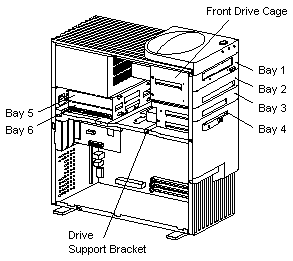
The following is a detailed description of the drive bay contents:
CD-ROM Drive: The server comes with an
integrated drive electronics (IDE) CD-ROM drive.
Open Bays: The server's design accommodates
3.5-inch and 5.25-inch devices, such as hard disk,
tape, and rewritable optical disk drives. The number
and capacities of the hard disk drives vary by model.
For information on the supported types of drives and
their installation, see
Drive specifications,
Preinstallation steps (all bays),
and http://www.ibm.com/pc/us/compat/ on
the World Wide Web.
Diskette Drive: The 3.5-inch, 1.44 MB 2 diskette
drive uses 1 MB (unformatted) or 2 MB (unformatted)
diskettes.
Back to 
More INFORMATION / HELP is available at the IBM-HelpCenter
Please see the LEGAL - Trademark notice.
Feel free - send a  for any BUG on this page found - Thank you.