


|
|
|
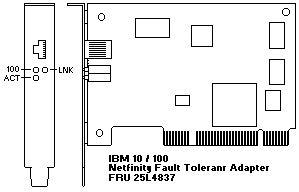
If a fail or other error message is displayed, go to (below) 'Common Problems and Solutions' to see if the problem can be solved.
For more information see Installation README File - V-1.01
Common Problems and Solutions
| Problem | Action |
|---|---|
| The AMDDIAG.EXE program | The PCI BIOS is not configuring the adapter correctly. |
| reports the adapter's | See (below) 'PCI Installation Tips'. |
| interrupt as 0 or 255. | |
| The AMDDIAG.EXE program | The PCI BIOS is not configuring the adapter correctly. |
| indicates that there is | See (below) 'PCI Installation Tips'. |
| No PCI Bus. | |
| The server halts when | Change the PCI BIOS interrupt settings. |
| loading drivers. | See (below) 'PCI Installation Tips'. |
| The diagnostics are completed | Ensure that the network cable is securely attached. |
| successfully, but the | Ensure that you are using category 5 cabling when |
| connection fails. | operating at 100 Mbps. |
| LNK LED does not light. | Check all connections at the adapter and the hub. |
| Try another port on the hub. | |
| If you forced duplex mode, ensure that you also force | |
| the speed to either 10 or 100 Mbps. | |
| Ensure that the hub port is configured for the correct | |
| speed, 10 or 100 Mbps. | |
| ACT LED does not light | Ensure that you have loaded the network device drivers. |
| If you suspect that the network might be idle, try | |
| sending data from the workstation. | |
| Try another adapter if the adapter is not transmitting | |
| or receiving data. | |
| Data is corrupted or | Ensure that you are using category 5 cabling when |
| sporadic. | operating at 100 Mbps. |
| The adapter stopped working | Ensure that the cable is connected to the Netfinity |
| when another adapter was | 10/100 Fault Tolerant Adapter. |
| added to the server. | Ensure that your PCI system BIOS is current. |
| Try reseating the adapter. | |
| See (below) 'PCI Installation Tips'. | |
| The adapter stopped working | Try reseating the adapter or try a different slot. |
| without apparent cause. | The network device driver files are missing or might |
| be corrupted, reinstall the drivers. | |
| Try a different Netfinity 10/100 Fault Tolerant Adapter. |
PCI Installation Tips
Some PCI servers require additional steps to configure a PCI adapter.
You might need to:
| Parameter Names | Values |
|---|---|
| PCI slot #: | Slot where the adapter is installed |
| Master: | ENABLED |
| Subordinate: | ENABLED |
| Latency timer: | 40 |
| Interrupt: | Choose any one of several that the BIOS setup provides. |
| Edge-level: | Level |
