


|
|
|
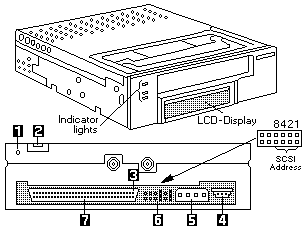
Indicator Lights
| Top light (amber) | When this light is flashing, an error has occured. |
|---|---|
| When this light is on, the tape drive needs cleaning. | |
| Middle light (green) | When this ligt is on, the tape cartridge is loaded, |
| and the tape drive is operational. | |
| Bottom light (green) | When this light is flashing, the tape is in motion |
LCD Messages
| Reset Messages | When the tape drive is reset, the LCD cycles through this messages. |
|---|---|
| RESET | First message during the power-on sequence |
| MODEL | Model number of the tape drive |
| SUBMOD | Submodel number of the tape drive |
| SN | Serial number of the tape drive |
| CODE | Level of the tape drive microcode |
| LASTCLN | Number of hours since the tape drive was cleaned |
| COMPRESSION | Compression turned on or off by default |
| SINGLE ENDED | Drive is single ended SCSI |
| WIDE | Drive has wide SCSI configuration |
| SCSI ID | SCSI ID of the tape drive |
| LANGUAGE | Current language for the LCD appears when you hold |
| the UNLOAD button after the RESET message appears | |
| Press and hold the button to cycle through the available | |
| languages until the one you want appears. | |
| Tape Drive Status Messages | |
| READY-NO TAPE | Drive is ready to accept a cartridge |
| LOADING | Drive is loading the tape |
| READY-TAPE | Drive has successfully loaded the tape and is ready |
| for read and write operations. | |
| EJECT | Unload button was pressed. Drive will eject the cartridge |
| as soon as it has finished its current operation | |
| EJECT PREVNT | Software has disabled the eject function with the |
| PREVENT/ALLOW MEDIA REMOVAL command. Drive will rewind | |
| and unload the tape, but will not eject the cartridge. | |
| ILLEGAL TAPE | Drive detected an incomplete cartridge and eject it |
| Tape Motion Messages | |
| READ | Drive is reading data. The + sign appears when the |
| data is compressed. The boxes show the amount of tape used | |
| WRITE | Drive is writing data. The + sign appears when the |
| data is compressed. The boxes show the amount of tape used | |
| PROTECTED | Drive cannot write data because the data cartridge is |
| write protected | |
| ILLEGAL WRT | Drive cannot write the type of tape cartridge inserted. |
| This message remains until an appropriate tape is | |
| inserted and a tape motion command is issued. | |
| SEARCH | High-speed search in progress |
| REWIND | Tape rweind in progress |
| ERASE | Drive is erasing data on the tape |
| Cleaning Messages | |
| CLEAN SOON | Drive should be cleaned at the next convenient time |
| MUST CLEAN | Drive must be cleaned after a metal particle tape has |
| been used in the drive. If you attempt to insert a data | |
| cartridge before cleaning the tape drive, the cartridge | |
| will be ejected. | |
| CLEANING | Cleaning in progress |
| DEPLETED | Cleaning tape in the cartridge is depleted, the drive |
| ejects the cartridge. Use a new cleaning cartridge. | |
| Error Messages | |
| When a tape drive error occurs, the LCD cycles through the | |
| current error code and previous error codes. | |
| ERR 1: xx yy zz | The most recent error displays where xx is the fault |
| symptom code, and yy and zz indicate secondary errors (if any) | |
| ERR 2 (or 3): xx yy zz | Previous eror messages display |
The following table describes the indicator light combinations that occur during tape operation:
| Tape Drive Condition | Top Light | Middle Light | Bottom Light |
|---|---|---|---|
| POST or reset | On | On | On |
| Error or failed POST | Flash | Off | Off |
| Ready, no tape loaded | N/A | Off | Off |
| Ready, tape loaded | N/A | On | Off |
| Normal tape motion | N/A | On | Flash |
| Time to clean | On | N/A | N/A |
| Clean in progress | On | Off | Flash |
If the drive fails with a flashing amber indicator light, three sets
of numbers appear on the LCD showing the three most recent errors.
The first two digits in error 1 are the fault symptom code for the most
recent error. Using this fault symptom code, go to the table below
to help resolve the problem.
The following table lists fault symptom codes that might
display on the LCD. The fault symptom codes are arranged in
alphanumeric order:
| Fault System Codes |
Error Recovery Procedures |
|---|---|
| 02, 05, 10, 15 C0, C1, C2, C3 C4, C7, C8, CA CB, D8, DC, E0 E1, E2, E3, E4 E5, E6, E7, E9 |
Restart the software backup procedure. |
| 03, 27, 4C, 73 | Move the write protect switch on the data cartridge to write enable the tape. |
| 08, 17, 18, 19 34, 35, 98, 99 9A, 9C, A1, A2 A4, A5, A7, A8 |
Perform the actions in the following order: 1. Reset the tape drive by holding down the unload button for more than 10 seconds, then restart the backup software procedure. 2. Replace the tape drive. |
| 0B | Perform the actions in the following order: 1. Clean the tape drive and restart the backup software operation. 2. Replace the tape drive. |
| 11, 16, 36, 38 95, 9B, 9D, 9E 9F, AC, AD, AE B0, B3, B4, B5 |
Perform the actions in the following order: 1. Clean the tape drive and restart the backup software operation. 2. Repeat the backup software operation with a new data cartridge. 3. Replace the tape drive. |
| 1C, 3A, 47, 74 C5, C6, DB, DD |
Repeat the backup software operation with a new data cartridge. |
| 37 | Perform the actions in the following order: 1. Clean the tape drive and restart the backup software operation. 2. Reset the tape drive by holding down the unload button for more than 10 seconds, then restart the backup software prodedure 3. Replace the tape drive. |
| 3D, 94 | Perform the actions in the following order: 1. Power the tape drive off and back on again, then reissue the failed command sequence. 2. Repeat the backup software operation with a new data cartridge. |
| 53, 8C, 8D, A3 A6 |
Perform the actions in the following order: 1. Power the tape drive off and back on again, then reissue the failed command sequence. 2. Replace the tape drive. |
| 96, 97 | Perform the actions in the following order: 1. Repeat the backup software operation with a new data cartridge. 2. Replace the tape drive. |
| 67, 6D, AF, E8 FA, FC, FD |
Replace the tape drive |
| C9 | Insert a data cartridge into the tape drive |
| D2, D6 | Power the tape drive off and back on again, then reissue the failed command sequence. |
| D7 | Repeat the operation with a different data cartridge, the tape drive cannot read the tape. :etable. |
