


|
|
|
Monitoring Status Information: You can monitor the ServeRAID controller status
by clicking on the active ServeRAID controller button on the Main Screen of the Administration and
Monitoring utility program. The currently active ServeRAID controller button is indicated by
a green or red light. (Green indicates an active controller, red indicates that the controller is not responding.)
If there is more than one ServeRAID controller in the system, click on the appropriate button to make it active.
A screen similar to the following appears.
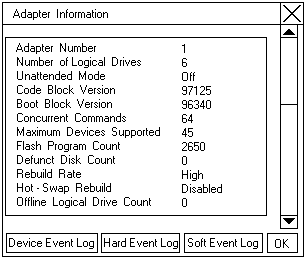
| Adapter Number | The active ServeRAID controller (1 to 8). |
|---|---|
| Number of Logical | The number of defined logical drives (0 to 8). |
| Drives. | |
| Unattended Mode | Off - The user chooses the recovery method when there is a ServeRAID |
| controller startup error. | |
| On - The ServeRAID controller chooses the recovery method when there is a | |
| startup error. | |
| Code Block | The current version level of the firmware microcode for the ServeRAID controller. |
| Version | |
| Boot Block | The current version level of the microcode loaded in the boot block for the |
| Version | ServeRAID controller. |
| Concurrent | The maximum numbers of concurrent commands supported. |
| Commands | |
| Maximum Devices | The maximum number of devices supported. |
| Supported | |
| Flash Program Count | The number of times that the ServeRAID controller microcode (Flash EEPROM) |
| has been flashed or updated. | |
| Defunct Disk Count | The current number of defunct hard disk drives. |
| Rebuild Rate | The setting for the rebuild rate can be low, medium, or high priority. |
| (The default setting is high.) | |
| Hot-Swap Rebuild | If hot-swap rebuild is set to enable, the ServeRAID controller will |
| rebuild a defunct drive automatically when all of the following conditions exist: | |
| ° The hot-swap rebuild parameter is set to Enable | |
| ° The defunct drive is part of a RAID level 1 or RAID level 5 logical drive | |
| ° The capacity of the replacement drive is equal to or greater than the | |
| capacity of the defunct drive | |
| ° No rebuild, synchronization, or RAID level change operation is in progress | |
| When you replace the drive and these requirements are met, the ServeRAID | |
| controller automatically initiates a rebuild of the drive | |
| without user intervention. | |
| Offline Logical | The current number of offline logical drives. |
| Drive Count | |
| Configuration | The number of times that the ServeRAID controller configuration information has |
| Update Count | been updated. |
Please see the LEGAL - Trademark notice.
Feel free - send a  for any BUG on this page found - Thank you.