 |

 IBM-AUSTRIA - PC-HW-Support 30 Aug 1999
 |
Rebuilding Drives
Rebuilding Drives
When a hard disk drives goes defunct (DDD), a Rebuild operation is required to
reconstruct the data for the device in its respective disk array.
You can rebuild only RAID level 1 and RAID level 5 logical drives. The data stored in stored in RAID level 0
logical drives cannot be reconstructed, therefore, RAID level 0 logical drives are blocked.
After the rebuild process completes, you can unblock the RAID level 0 logical drives, which redefines their state as
OKY and allows access to them once again. But remember, the RAID level 0 logical drive might contain damaged data.
You must re-create, install, or restore the data for the RAID level 0 logical drive from the most recent
backup disk or tape. (See 'Unblocking Logical Drives' for more information.)
To rebuild a drive:
- Click on the DDD device on the Main Screen of the Administration and Monitoring utility program.
- Click on Rebuild Device.
A screen similar to the following appears.
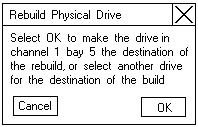
- Select a RDY drive on which to store the
reconstructed data, or click on OK to use the same
bay if you have physically replaced the drive.
Note: The replacement hard disk drive must be the same size or larger than the failed drive.
- The rebuild process begins and reports progress information on the screen.
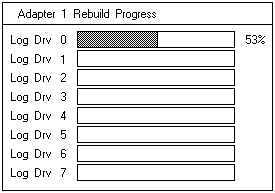
Notes:
- Only one Rebuild operation can take place at a time.
- The Rebuild operation changes the hard disk drive state from DDD to RBL if the array
contains a CRT logical drive.
After the Rebuild operation completes the hard disk drive state changes from RBL to ONL.
(When you rebuild to a RDY drive, the DDD drive is removed from the array and the state of the DDD
drive is changed to defunct hot-spare (DHS).)
- If multiple hot-spare (HSP) drives are available, the ServeRAID controller searches all the bays on each
channel for a hot-spare drive of the appropriate size and the first appropriate hot-spare drive found enters
the Rebuild state.
- If a hot-spare (HSP) drive is available, a Rebuild operation starts automatically.
Back to 
More INFORMATION / HELP is available at the IBM-HelpCenter
Please see the LEGAL - Trademark notice.
Feel free - send a  for any BUG on this page found - Thank you.