 |

 IBM-AUSTRIA - PC-HW-Support 30 Aug 1999
 |
Video-Sleep-Register Address Setting (J6A2) (Netfinity 7000 - 8651)
Video-Sleep-Register Address Setting (J6A2)
The Video-Sleep-Register jumper determines which I/O
port the SVGA controller uses for its internal AT mode
setup port. The starting address of the default port is
03C3H (pins 1 and 2). When this jumper is set to pins 2
and 3, the Video-Sleep-Register address changes to 46E8H.
If no keyboard activity occurs after a specified timeout
period (1 to 128 minutes, as specified through the Setup
program), the Video-Sleep-Register jumper blanks out the
monitor screen. When this happens, you must enter a
password to reactivate the monitor and keyboard.
To change the location of the Video Sleep Register:
- Power-off the server and peripheral devices and
remove the top cover (see 'Cover (Top)').
- Identify the Video-Sleep-Register jumper, J6A2.
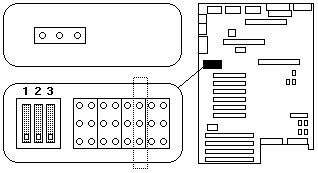
- If the primary processor board blocks access to the
jumper, remove it (see 'Processor or Memory Board').
- Set the address of the Video-Sleep Register:
- To set the address to 03C3H (factory default),
move the jumper to pins 1 and 2.
- To set the address to 46E8H, move the jumper
to pins 2 and 3.
- If you removed the primary processor board, install it.
Back to 
More INFORMATION / HELP is available at the IBM-HelpCenter
Please see the LEGAL - Trademark notice.
Feel free - send a  for any BUG on this page found - Thank you.